OLD JM112 Expander Installation and Programming
Introduction
Thank-you for purchasing our channel expander. We are confident that you will enjoy many hours of pleasure as you watch your model COME ALIVE! The JM112 will add 12 more channels to your radio.
The expander consists of a keypad and a decoder circuit board:
- 1. The keypad contains a series of resistors that replace the potentiometer of a proportional channel on the transmitter.
- 2. The decoder circuit board:
- Contains a microprocessor and associated electronic components. When hooked up to the receiver in a model, it decodes the pulses from the keypad on the transmitter.
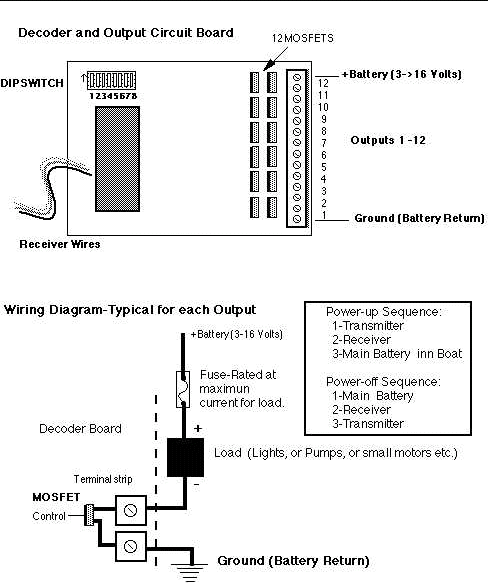
- Has 12 outputs on the terminal strip, each of which is controlled by a MOSFET. Each output can handle 5 amps of current (or a maximum of 25 amps for the entire board) The outputs provide a ground path to complete the circuit when turning on a channel. By using this common ground, features of different voltages can all operate on the same circuit board.
- Contains static sensitive parts, and should be kept in its static protective protective bag as long as possible.
The first 6 outputs on the decoder can operate in two different modes:
- Momentary Mode: The feature on the model is activated when the key of the keypad is is pressed, and is deactivated when the key is released.
- Toggle Mode: The feature on the model is activated when the key is pressed and remains activated when the key is released. The feature is deactivated when the same key is pressed again.
Carefully read all the installation and testing instructions before installing the keypad and decoder circuit board.
Parts List
The following is a list of parts that should be included:
- Keypad
- Installation and Testing Instructions
- Decoder Circuit Board
- 4 Pieces of heat-shrink tubing
- 4 Nylon standoffs
Keypad Installation
We recommend that you connect the keypad to a transmitter with at least 3 proportional channels. This will give you 1 channel for rudder, 1 for the throttle, and 1 for the expander. The channel selected for the keypad will depend on your personal preference. The keypad will not work on a switched channel on most radios.
Install the keypad as follows:
- Remove the back of the transmitter.
- Select the potentiometer of the proportional channel to used for the keypad.
- Select a convenient location on the outside of the transmitter to mount the keypad.
- Mark the center of the location selected for the keypad.
- Carefully drill a 5/64" hole in the transmitter case in the center of keypad location. (do not allow the drill bit to contact any other parts or wires inside the transmitter)
- Feed the keypad wires through hole from outside of transmitter.
- Attach keypad to outside of transmitter. (double-sided tape works well)
- Label the 3 wires on the selected potentiometer as follows:
Center wire- #1
Positive wire- #2
Negative wire-#3
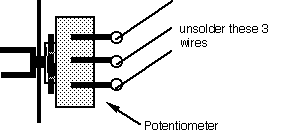
If you are not sure of the polarity of the two outside wires, turn on the transmitter, and check the polarity with a voltmeter. Turn off the transmitter.
- Carefully unsolder the 3 numbered wires from the potentiometer. It is now disconnected from the transmitter and has no effect on the operations of the model. If there is a trim potentiometer on the selected channel, carefully unsolder the center wire from the trim potentiometer and leave it disconnected. Use 1 piece of heat-shrink tubing to insulate the end of the wire.
- Pull a piece of heat-shrink tubing over each of the 3 numbered wires. Solder these 3 wires to the coloured wires from the keypad as follows:
Keypad white wire to wire #1
Keypad red wire to wire #2
Keypad black wire to wire #3
- Slide the heat-shrink tubing over the soldered connections and use an appropriate heat source to shrink the tubing.
- Reinstall the back of the transmitter.
- Test the keypad installation as follows:
- Plug a servo into the corresponding channel in the receiver.
- Turn on transmitter and receiver,
- Starting with key 1, press each key in numerical order. The servo should move when the key is pressed, and return to its original position when the key is released. The servo arm should move further as each key is pressed.
- If the servo does not move as described, go back and make sure all the previous steps were done correctly.
- If the servo moves in the opposite direction than described above, this means wires #2 and #3 are reversed. Or use the servo reversing switch for that channel (if the radio has that capability)
Decoder Board Installation
Important: While installing the decoder circuit board, do not allow any of the MOSFETS to be shorted out to each other, or to any stray wires.
Install the decoder circuit board as follows:
- Select a location for the circuit board in your model according to the following:
-Decoder must be attached to a flat non-conductive surface.
-Decoder must not come in contact with water.
-DIP switch must be accessible for programming and mode selection.
-Outputs on terminal strip must be accessible for wiring various features.
- Mount the circuit board in your model. Use the 4 mounting holes drilled in the circuit board. Use the 4 nylon standoffs (included) to prevent warping the board. Be careful when using the 2 holes nearest the MOSFETS. There are copper tracks on the circuit board near these holes.
- Plug the decoder into the channel of the receiver that corresponds to the channel selected for the keypad. If the receiver plug does not match your radio, cut the end off, and splice on the correct plug.
Decoder Programming
The decoder must be programmed to match your transmitter:
- When the decoder is connected to receiver for the first time.
- When the decoder is used with a different transmitter.
Note: This is done using DIP Switches 7 and 8. They are called LEARN #1 and LEARN #2.
THIS PROCEDURE ONLY NEEDS TO BE DONE THE FIRST TIME THE DECODER IS POWERED UP.
After it has been calibrated the first time, the values are stored in permanent memory and will be maintained even when the power is turned off.
Programming Steps:
- Turn on transmitter.
- Hold down KEY #1 on the KEYPAD and then move DIP Switch 7 (LEARN #1) up to the 'ON' position. Wait for 1 second, then move it back down to the off position. Now release Key #1on the Keypad.
- Now push KEY #12 (it is the '#' symbol on the Keypad) and hold it, while you toggle DIP Switch #8 (LEARN #2)-the same way as was done above. After the DIP switch is back in the OFF position release KEY #12.
- Output Channels Mode selection: The 12 keys on the keypad are all set to operate in 'Momentary Mode' as a factory setting. Keys 1 to 6 (and therefore outputs 1 to 6) can be set to 'TOGGLE MODE' using DIP Switches 1 to 6. When the dipswitch is in the OFF postion, then that channel is in Momentary Mode.When the dipswitch is moved to the ON postion then the output will toggle.
Terminal Strip Wiring
Install the wires from your models features as follows: (refer to figure 1)
- Connect each feature to the terminal strip as follows:
-Connect the positive wire of the feature through a fuse (rated to protect that feature) to the positive lead of the battery used to operate that feature.
-Connect the negative wire of the feature to the selected output on the terminal strip.
- Connect the positive lead of the main battery through a 1/4 amp fuse, to the positive terminal on the terminal strip. This supplies a small amount of current to power the output circuit on the decoder board. If more than 1 battery is used, it does not matter which one is connected to the positive terminal of the terminal strip as long as the voltage is between 3 and 16 volts.
- Connect the negative leads of each battery used (for powering features) to the common ground terminal on the terminal strip.
- Test the decoder board, programming and terminal strip wiring as follows;
- Turn on the transmitter, receiver, and output power switch(es).
- Press each key on the keypad, and make sure each feature is activated when its key is pressed.
- Turn off output power switch(s), receiver, and transmitter.
Note: If a feature draws close to 5 amps of current, the MOSFET for that channel will get warm. This is normal, do not be concerned. Do not exceed 25 amps maximum current draw at any time.
This completes the installation and testing of your JM112 Expander!
Before you call for technical assistance:
Every keypad and decoder circuit board is tested before shipment to ensure you receive a high quality product. As a result, our products should operate correctly unless they have been accidentally damaged during shipment or installation. If your expander does not operate properly, make the following check(s) before calling us:
- Make sure all batteries are fully charged and the rudder and throttle are working in your boat.
- Make sure decoder receiver plug is properly connected to the corresponding channel the keypad is connected to on the transmitter.
- Check all fuses. (If a fuse has blown, investigate and solve the problem before replacing fuse).
- Remove the decoder receiver plug, and plug in a servo. Repeat keypad installation test (page 3, section 13)
- Make sure receiver plug for decoder board is not frayed or disconnected at either end.
- Check all wiring of features to ensure they are properly connected.
Technical Assistance
For technical assistance, please call (613) 253-0204 If no one is able to take your call, please leave a message on the voice mail system and we will return your call as soon as possible. We can also be reached by email: mws@storm.ca
Warranty
- The Keypad and decoder circuit board are warranteed for 12 months from date of shipment. A faulty keypad or decoder board will be replaced or repaired free of charge during this period.
- Any item damaged due to water, misuse, or incorrect installation, will be replaced or repaired at your expense only.
- For returns from outside of Canada, please include the words
BROKEN ELECTRONIC CIRCUIT RETURNING FOR REPAIR on the outside the parcel, to satisfy Customs personnel.
 Return Items to:             Mark Warren
                           121 Mississippi Road,
                           Carleton Place , Ontario,
                           Canada,     K7C 4G2
Expander Specifications
- Keypad dimensions: 2" x 2.7" x 0.7". Weight:1.1oz (31.0g).
- JM112 Decoder circuit board dimensions: 3.0" x 4.0" x 0.75". Weight: 3.2 oz (90.4g)